Tuesday, January 15, 2008
37 Things You may not Know
1. CocaCola was originally green.
2. The most common name in the world is Mohammed.
3. The name of all the continents ends with the same letter that they start with.
4. The strongest muscle in the body is the tongue.
5. There are two credit cards for every person in the United States.
6. TYPEWRITER is the longest word that can be made using the letters only on one row of the keyboard.
7. Women blink nearly twice as much as men!..
8. You can't kill yourself by holding your breath..
9. It is impossible to lick your elbow.
10. People say "Bless you" when you sneeze because when you Sneeze, your heart stops for a millisecond.
11. It is physically impossible for pigs to look up into the sky.
12. The "sixth sick sheik's sixth sheep's sick" is said to be the
toughest tongue twister in the English language.
13. If you sneeze too hard, you can fracture a rib. If you try to
Suppress a sneeze; you can rupture a blood vessel in your head or neck and die.
14. Each king in a deck of playing cards represents great king from History. "Spades" King David; "Clubs" Alexander the Great;" Hearts" Charlemagne; "Diamonds" Julius Caesar.
15. 111,111,111 x 111,111,111 = 12,345,678,987, 654,321
16. If a statue of a warrior on a horse has both front legs in the air, the person died in battle. If the horse has one front leg in the air, the person died as a result of wounds received in battle.If the horse has a all four legs on the ground, the person died of natural causes.
17 What do bullet proof vests, fire escapes, windshield wipers and laser printers all have in common?
Ans. All invented by women.
18. Honey This is the only food that doesn't spoil.
19. A crocodile cannot stick its tongue out.
20. A snail can sleep for three years.
21. All polar bears are left handed.
22. American Airlines saved $40,000 in 1987 by eliminating one olive from each salad served in firstclass.
23. Butterflies taste with their feet.
24. Elephants are the only animals that can't jump.
25. In the last 4000 years, no new animals have been domesticated.
26. On average, people fear spiders more than they do death.
27. Shakespeare invented the word 'assassination' and 'bump'.
28. Stewardesses is the longest word typed with only the left hand.
29. The ant always falls over on its right side when intoxicated.
30. The electric chair was invented by a dentist.
31. The human heart creates enough pressure when it pumps out to the body to squirt blood 30 feet.
32. Rats multiply so quickly that in 18 months, two rats could have over million descendants.
33. Wearing headphones for just an hour will increase the bacteria in your ear by 700 times.
34. The cigarette lighter was invented before the match.
35. Most lipstick contains fish scales.
36. Like fingerprints, everyone's tongue print is different
37. And finally 99% of people who read this will try to lick their elbow.


World Domains
Hi, this is really funny, I've got this on a joke site, the funny part is that the names are real. Just see for yourself.
Everyone knows that if you are going to operate a business in today’s world you need a domain name. It is advisable to look at the domain name selected as other see it and not just as you think it looks. Failure to do this may result in situations such as the following (legitimate) companies who deal in everyday humdrum products and services but clearly didn’t give their domain names enough consideration:
A site called ‘Who Represents‘ where you can find the name of the agent that represents a celebrity. Their domain name is www.whorepresents.com
Experts Exchange, a knowledge base where programmers can exchange advice and views at www.expertsexchange.com
Looking for a pen? Look no further than Pen Island at www.penisland.net
Need a therapist? Try Therapist Finder at www.therapistfinder.com
Then of course, there’s the Italian Power Generator company… www.powergenitalia.com
And now, we have the Mole Station Native Nursery, based in New South Wales: www.molestationnursery.com
If you’re looking for computer software, there’s always www.ipanywhere.com
Welcome to the First Cumming Methodist Church. Their website is www.cummingfirst.com
Then, of course, there’s these brainless art designers, and their whacky website: www.speedofart.com
Want to holiday in Lake Tahoe? Try their brochure website at www.gotahoe.com
Everyone knows that if you are going to operate a business in today’s world you need a domain name. It is advisable to look at the domain name selected as other see it and not just as you think it looks. Failure to do this may result in situations such as the following (legitimate) companies who deal in everyday humdrum products and services but clearly didn’t give their domain names enough consideration:
A site called ‘Who Represents‘ where you can find the name of the agent that represents a celebrity. Their domain name is www.whorepresents.com
Experts Exchange, a knowledge base where programmers can exchange advice and views at www.expertsexchange.com
Looking for a pen? Look no further than Pen Island at www.penisland.net
Need a therapist? Try Therapist Finder at www.therapistfinder.com
Then of course, there’s the Italian Power Generator company… www.powergenitalia.com
And now, we have the Mole Station Native Nursery, based in New South Wales: www.molestationnursery.com
If you’re looking for computer software, there’s always www.ipanywhere.com
Welcome to the First Cumming Methodist Church. Their website is www.cummingfirst.com
Then, of course, there’s these brainless art designers, and their whacky website: www.speedofart.com
Want to holiday in Lake Tahoe? Try their brochure website at www.gotahoe.com
Wednesday, December 12, 2007
How good your eyes are???
Hi there, its been a time since I last post something..well was kinda busy these days. I hope that I will be able to devote some time now. I come across this picture in a forum and thought you might wanna see this.
First take a look at this picture closely and tell what you see...

Annoying for the eyes...right???
Now get up from the chair / sofa / wherever you're sitting , and move about 1 to 1 and a half meter away from the screen..and tell me what you see..(well thats the cool part of the picture)
First take a look at this picture closely and tell what you see...
Annoying for the eyes...right???
Now get up from the chair / sofa / wherever you're sitting , and move about 1 to 1 and a half meter away from the screen..and tell me what you see..(well thats the cool part of the picture)
Thursday, October 18, 2007
Global warming......some concrete proof
Some days back, more precisely on the 15th of october, it was Blog Action Day where thousands of bloggers were blogging about the environment (except me, coz my internet connection was really bad). Anyways, so where's the situation about global warming has reached???..well I won't get into much detail( just google it for more info)...hmm what people must realise is that apart from rise in sea level, global warming have many sides effect, there is also an increase in intensity of extreme weather events n many others nature disbalance.
What I wanted to share with you is a picture which gives us one consequence of global warming (got this in a mail).

Well as the picture speaks for itself....we surely don't require any satelite images of glaciers giving way to give evidence of global warming....Lol:)
Ok that was just to joke a bit.
Global warming is a serious issue which affects(or will) us all.
Let us all be responsible for our acts and take the necessary measures to preserve.... even if you think that your contribution will only account for less than 0.000001%
( that's already a lot to save our world...)
What I wanted to share with you is a picture which gives us one consequence of global warming (got this in a mail).
Well as the picture speaks for itself....we surely don't require any satelite images of glaciers giving way to give evidence of global warming....Lol:)
Ok that was just to joke a bit.
Global warming is a serious issue which affects(or will) us all.
Let us all be responsible for our acts and take the necessary measures to preserve.... even if you think that your contribution will only account for less than 0.000001%
( that's already a lot to save our world...)
Friday, October 5, 2007
New look or new face....
diaestro.blogspot get a new face :)
Hello guys, how did you find my new theme? There is a lot of templates for bloggers availble on the net...so why limit myself to the few default templates (most not appealing). Hmmm got to customize it a bit more and I hope to find the time to post. Well me gotta go now...(besides, it would be nice if you could drop some comments).
Monday, September 24, 2007
10 things you can do when Windows XP won't boot
When your computer hardware appears to power up okay, but the Windows XP operating system won't boot properly, you have to begin a troubleshooting expedition that includes getting into the operating system, determining the problem, and then fixing it. To help you get started on this expedition, here are 10 things you can do when Windows XP won't boot.
#1: Use a Windows startup disk
One of the first things you should reach for when troubleshooting a Windows XP boot problem is a Windows startup disk. This floppy disk can come in handy if the problem is being caused when either the startup record for the active partition or the files that the operating system uses to start Windows have become corrupted.
To create a Windows startup disk, insert a floppy disk into the drive of a similarly configured, working Windows XP system, launch My Computer, right-click the floppy disk icon, and select the Format command from the context menu. When you see the Format dialog box, leave all the default settings as they are and click the Start button. Once the format operation is complete, close the Format dialog box to return to My Computer, double-click the drive C icon to access the root directory, and copy the following three files to the floppy disk:
* Boot.ini
* NTLDR
* Ntdetect.com
After you create the Windows startup disk, insert it into the floppy drive on the afflicted system and press [Ctrl][Alt][Delete] to reboot the computer. When you boot from the Windows startup disk, the computer will bypass the active partition and boot files on the hard disk and attempt to start Windows XP normally.
#2: Use Last Known Good Configuration
You can also try to boot the operating system with the Last Known Good Configuration feature. This feature will allow you to undo any changes that caused problems in the CurrentControlSet registry key, which defines hardware and driver settings. The Last Known Good Configuration feature replaces the contents of the CurrentControlSet registry key with a backup copy that was last used to successfully start up the operating system.
To use the Last Known Good Configuration feature, first restart the computer by pressing [Ctrl][Alt][Delete]. When you see the message Please select the operating system to start or hear the single beep, press [F8] to display the Windows Advanced Options menu. Select the Last Known Good Configuration item from the menu and press [Enter].
Keep in mind that you get only one shot with the Last Known Good Configuration feature. In other words, if it fails to revive your Windows XP on the first attempt, the backup copy is also corrupt.
#3: Use System Restore
Another tool that might be helpful when Windows XP won't boot is System Restore. System Restore runs in the background as a service and continually monitors system-critical components for changes. When it detects an impending change, System Restore immediately makes backup copies, called restore points, of these critical components before the change occurs. In addition, System Restore is configured by default to create restore points every 24 hours.
To use System Restore, first restart the computer by pressing [Ctrl][Alt][Delete]. When you see the message Please select the operating system to start or hear the single beep, press [F8] to display the Windows Advanced Options menu. Now, select the Safe Mode item from the menu and press [Enter].
Once Windows XP boots into Safe mode, click the Start button, access the All Programs | Accessories | System Tools menu, and select System Restore. Because you're running in Safe mode, the only option on the opening screen of the System Restore wizard is Restore My Computer To An Earlier Time, and it's selected by default, so just click Next. Then, follow along with the wizard to select a restore point and begin the restoration procedure.
#4: Use Recovery Console
When a Windows XP boot problem is severe, you'll need to use a more drastic approach. The Windows XP CD is bootable and will provide you with access to a tool called Recovery Console.
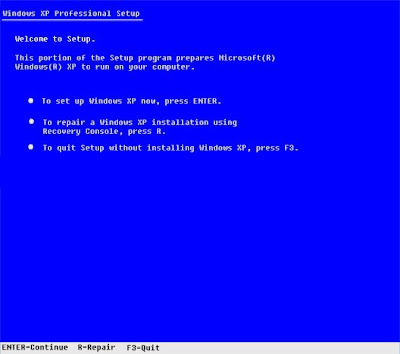
To boot from the Windows XP CD, insert it into the CD-ROM drive on the problem system and press [Ctrl][Alt][Delete] to reboot the computer. Once the system begins booting from the CD, simply follow the prompts that will allow the loading of the basic files needed to run Setup. When you see the Welcome To Setup screen, shown in Figure A, press R to start the Recovery Console.
Figure A
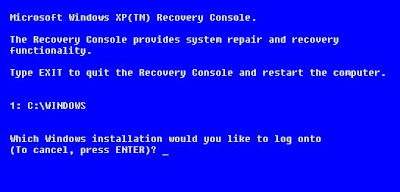
You'll then see a Recovery Console menu, like the one shown in Figure B. It displays the folder containing the operating system's files and prompts you to choose the operating system you want to log on to. Just press the menu number on the keyboard, and you'll be prompted to enter the Administrator's password. You'll then find yourself at the main Recovery Console prompt.
Figure B
#5: Fix a corrupt Boot.ini
As the Windows XP operating system begins to load, the Ntldr program refers to the Boot.ini file to determine where the operating system files reside and which options to enable as the operating system continues to load. So if there's a problem rooted in the Boot.ini file, it can render Windows XP incapable of booting correctly.
If you suspect that Windows XP won't boot because Boot.ini has been corrupted, you can use the special Recovery Console version of the Bootcfg tool to fix it. Of course, you must first boot the system with the Windows XP CD and access the Recovery Console as described in #4.
To use the Bootcfg tool, from the Recovery Console command prompt, type
Bootcfg /parameter
Where /parameter is one of these required parameters:
* /Add--Scans the disk for all Windows installations and allows you to add any new ones to the Boot.ini file.
* /Scan--Scans the disk for all Windows installations.
* /List--Lists each entry in the Boot.ini file.
* /Default--Sets the default operating system as the main boot entry.
* /Rebuild--Completely re-creates the Boot.ini file. The user must confirm each step.
* /Redirect--Allows the boot operation to be redirected to a specific port when using the Headless Administration feature. The Redirect parameter takes two parameters of its own, [Port Baudrate ] | [UseBiosSettings].
* /Disableredirect--Disables the redirection.
#6: Fix a corrupt partition boot sector
The partition boot sector is a small section of the hard disk partition that contains information about the operating system's file system (NTFS or FAT32), as well as a very small machine language program that is crucial in assisting the operating system as it loads.
If you suspect that Windows XP won't boot because the partition boot sector has been corrupted, you can use a special Recovery Console tool called Fixboot to fix it. Start by booting the system with the Windows XP CD and accessing the Recovery Console as described in #4.
To use the Fixboot tool, from the Recovery Console command prompt, type
Fixboot [drive]:
Where [drive] is the letter of the drive to which you want to write a new partition boot sector.
#7: Fix a corrupt master boot record
The master boot record occupies the first sector on the hard disk and is responsible for initiating the Windows boot procedure. The master boot record contains the partition table for the disk as well as a small program called the master boot code, which is responsible for locating the active, or bootable, partition, in the partition table. Once this occurs, the partition boot sector takes over and begins loading Windows. If the master boot record is corrupt, the partition boot sector can't do its job and Windows won't boot.
If you suspect Windows XP won't boot because the master boot record has been corrupted, you can use the Recovery Console tool Fixmbr to fix it. First, boot the system with the Windows XP CD and access the Recovery Console as described in #4.
To use the Fixmbr tool, from the Recovery Console command prompt, type
Fixmbr [device_name]
Where [device_name] is the device pathname of the drive to which you want to write a new master boot record. For example, the device pathname format for a standard bootable drive C configuration would look like this:
\Device\HardDisk0
#8: Disable automatic restart
When Windows XP encounters a fatal error, the default setting for handling such an error is to automatically reboot the system. If the error occurs while Windows XP is booting, the operating system will become stuck in a reboot cycle--rebooting over and over instead of starting up normally. In that case, you'll need to disable the option for automatically restarting on system failure.
When Windows XP begins to boot up and you see the message Please select the operating system to start or hear the single beep, press [F8] to display the Windows Advanced Options Menu. Then, select the Disable The Automatic Restart On System Failure item and press [Enter]. Now, Windows XP will hang up when it encounters the error and with any luck, it will display a stop message you can use to diagnose the problem.
#9: Restore from a backup
If you can't seem to repair a Windows XP system that won't boot and you have a recent backup, you can restore the system from the backup media. The method you use to restore the system will depend on what backup utility you used, so you'll need to follow the utility's instructions on how to perform a restore operation.
#10: Perform an in-place upgrade
If you can't repair a Windows XP system that won't boot and you don't have a recent backup, you can perform an in-place upgrade. Doing so reinstalls the operating system into the same folder, just as if you were upgrading from one version of Windows to another. An in-place upgrade will usually solve most, if not all, Windows boot problems.
Performing a Windows XP in-place upgrade is pretty straightforward. To begin, insert the Windows XP CD into the drive, restart your system, and boot from the CD. Once the initial preparation is complete, you'll see the Windows XP Setup screen (shown earlier in Figure A). Press [Enter] to launch the Windows XP Setup procedure. In a moment, you'll see the License Agreement page and will need to press [F8] to acknowledge that you agree. Setup will then search the hard disk looking for a previous installation of Windows XP. When it finds the previous installation, you'll see a second Windows XP Setup screen, as shown in Figure C.
Figure C
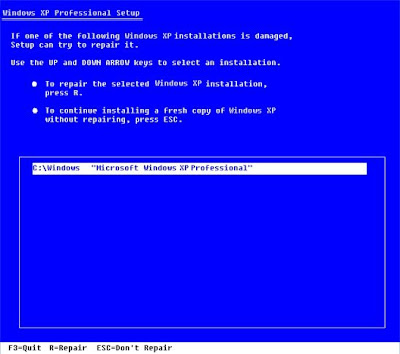
This screen will prompt you to press R to repair the selected installation or to press [Esc] to install a fresh copy of Windows XP. In this case, initiating a repair operation is synonymous with performing an in-place upgrade, so you'll need to press R. When you do so, Setup will examine the disk drives in the system. It will then begin performing the in-place upgrade.
Keep in mind that after you perform an in-place upgrade or repair installation, you must reinstall all updates to Windows.
#1: Use a Windows startup disk
One of the first things you should reach for when troubleshooting a Windows XP boot problem is a Windows startup disk. This floppy disk can come in handy if the problem is being caused when either the startup record for the active partition or the files that the operating system uses to start Windows have become corrupted.
To create a Windows startup disk, insert a floppy disk into the drive of a similarly configured, working Windows XP system, launch My Computer, right-click the floppy disk icon, and select the Format command from the context menu. When you see the Format dialog box, leave all the default settings as they are and click the Start button. Once the format operation is complete, close the Format dialog box to return to My Computer, double-click the drive C icon to access the root directory, and copy the following three files to the floppy disk:
* Boot.ini
* NTLDR
* Ntdetect.com
After you create the Windows startup disk, insert it into the floppy drive on the afflicted system and press [Ctrl][Alt][Delete] to reboot the computer. When you boot from the Windows startup disk, the computer will bypass the active partition and boot files on the hard disk and attempt to start Windows XP normally.
#2: Use Last Known Good Configuration
You can also try to boot the operating system with the Last Known Good Configuration feature. This feature will allow you to undo any changes that caused problems in the CurrentControlSet registry key, which defines hardware and driver settings. The Last Known Good Configuration feature replaces the contents of the CurrentControlSet registry key with a backup copy that was last used to successfully start up the operating system.
To use the Last Known Good Configuration feature, first restart the computer by pressing [Ctrl][Alt][Delete]. When you see the message Please select the operating system to start or hear the single beep, press [F8] to display the Windows Advanced Options menu. Select the Last Known Good Configuration item from the menu and press [Enter].
Keep in mind that you get only one shot with the Last Known Good Configuration feature. In other words, if it fails to revive your Windows XP on the first attempt, the backup copy is also corrupt.
#3: Use System Restore
Another tool that might be helpful when Windows XP won't boot is System Restore. System Restore runs in the background as a service and continually monitors system-critical components for changes. When it detects an impending change, System Restore immediately makes backup copies, called restore points, of these critical components before the change occurs. In addition, System Restore is configured by default to create restore points every 24 hours.
To use System Restore, first restart the computer by pressing [Ctrl][Alt][Delete]. When you see the message Please select the operating system to start or hear the single beep, press [F8] to display the Windows Advanced Options menu. Now, select the Safe Mode item from the menu and press [Enter].
Once Windows XP boots into Safe mode, click the Start button, access the All Programs | Accessories | System Tools menu, and select System Restore. Because you're running in Safe mode, the only option on the opening screen of the System Restore wizard is Restore My Computer To An Earlier Time, and it's selected by default, so just click Next. Then, follow along with the wizard to select a restore point and begin the restoration procedure.
#4: Use Recovery Console
When a Windows XP boot problem is severe, you'll need to use a more drastic approach. The Windows XP CD is bootable and will provide you with access to a tool called Recovery Console.
To boot from the Windows XP CD, insert it into the CD-ROM drive on the problem system and press [Ctrl][Alt][Delete] to reboot the computer. Once the system begins booting from the CD, simply follow the prompts that will allow the loading of the basic files needed to run Setup. When you see the Welcome To Setup screen, shown in Figure A, press R to start the Recovery Console.
Figure A
You'll then see a Recovery Console menu, like the one shown in Figure B. It displays the folder containing the operating system's files and prompts you to choose the operating system you want to log on to. Just press the menu number on the keyboard, and you'll be prompted to enter the Administrator's password. You'll then find yourself at the main Recovery Console prompt.
Figure B
#5: Fix a corrupt Boot.ini
As the Windows XP operating system begins to load, the Ntldr program refers to the Boot.ini file to determine where the operating system files reside and which options to enable as the operating system continues to load. So if there's a problem rooted in the Boot.ini file, it can render Windows XP incapable of booting correctly.
If you suspect that Windows XP won't boot because Boot.ini has been corrupted, you can use the special Recovery Console version of the Bootcfg tool to fix it. Of course, you must first boot the system with the Windows XP CD and access the Recovery Console as described in #4.
To use the Bootcfg tool, from the Recovery Console command prompt, type
Bootcfg /parameter
Where /parameter is one of these required parameters:
* /Add--Scans the disk for all Windows installations and allows you to add any new ones to the Boot.ini file.
* /Scan--Scans the disk for all Windows installations.
* /List--Lists each entry in the Boot.ini file.
* /Default--Sets the default operating system as the main boot entry.
* /Rebuild--Completely re-creates the Boot.ini file. The user must confirm each step.
* /Redirect--Allows the boot operation to be redirected to a specific port when using the Headless Administration feature. The Redirect parameter takes two parameters of its own, [Port Baudrate ] | [UseBiosSettings].
* /Disableredirect--Disables the redirection.
#6: Fix a corrupt partition boot sector
The partition boot sector is a small section of the hard disk partition that contains information about the operating system's file system (NTFS or FAT32), as well as a very small machine language program that is crucial in assisting the operating system as it loads.
If you suspect that Windows XP won't boot because the partition boot sector has been corrupted, you can use a special Recovery Console tool called Fixboot to fix it. Start by booting the system with the Windows XP CD and accessing the Recovery Console as described in #4.
To use the Fixboot tool, from the Recovery Console command prompt, type
Fixboot [drive]:
Where [drive] is the letter of the drive to which you want to write a new partition boot sector.
#7: Fix a corrupt master boot record
The master boot record occupies the first sector on the hard disk and is responsible for initiating the Windows boot procedure. The master boot record contains the partition table for the disk as well as a small program called the master boot code, which is responsible for locating the active, or bootable, partition, in the partition table. Once this occurs, the partition boot sector takes over and begins loading Windows. If the master boot record is corrupt, the partition boot sector can't do its job and Windows won't boot.
If you suspect Windows XP won't boot because the master boot record has been corrupted, you can use the Recovery Console tool Fixmbr to fix it. First, boot the system with the Windows XP CD and access the Recovery Console as described in #4.
To use the Fixmbr tool, from the Recovery Console command prompt, type
Fixmbr [device_name]
Where [device_name] is the device pathname of the drive to which you want to write a new master boot record. For example, the device pathname format for a standard bootable drive C configuration would look like this:
\Device\HardDisk0
#8: Disable automatic restart
When Windows XP encounters a fatal error, the default setting for handling such an error is to automatically reboot the system. If the error occurs while Windows XP is booting, the operating system will become stuck in a reboot cycle--rebooting over and over instead of starting up normally. In that case, you'll need to disable the option for automatically restarting on system failure.
When Windows XP begins to boot up and you see the message Please select the operating system to start or hear the single beep, press [F8] to display the Windows Advanced Options Menu. Then, select the Disable The Automatic Restart On System Failure item and press [Enter]. Now, Windows XP will hang up when it encounters the error and with any luck, it will display a stop message you can use to diagnose the problem.
#9: Restore from a backup
If you can't seem to repair a Windows XP system that won't boot and you have a recent backup, you can restore the system from the backup media. The method you use to restore the system will depend on what backup utility you used, so you'll need to follow the utility's instructions on how to perform a restore operation.
#10: Perform an in-place upgrade
If you can't repair a Windows XP system that won't boot and you don't have a recent backup, you can perform an in-place upgrade. Doing so reinstalls the operating system into the same folder, just as if you were upgrading from one version of Windows to another. An in-place upgrade will usually solve most, if not all, Windows boot problems.
Performing a Windows XP in-place upgrade is pretty straightforward. To begin, insert the Windows XP CD into the drive, restart your system, and boot from the CD. Once the initial preparation is complete, you'll see the Windows XP Setup screen (shown earlier in Figure A). Press [Enter] to launch the Windows XP Setup procedure. In a moment, you'll see the License Agreement page and will need to press [F8] to acknowledge that you agree. Setup will then search the hard disk looking for a previous installation of Windows XP. When it finds the previous installation, you'll see a second Windows XP Setup screen, as shown in Figure C.
Figure C
This screen will prompt you to press R to repair the selected installation or to press [Esc] to install a fresh copy of Windows XP. In this case, initiating a repair operation is synonymous with performing an in-place upgrade, so you'll need to press R. When you do so, Setup will examine the disk drives in the system. It will then begin performing the in-place upgrade.
Keep in mind that after you perform an in-place upgrade or repair installation, you must reinstall all updates to Windows.
Hide a Whole Partition of HDD
1. Go to Start > run > type "diskpart".
A DOS window will appear with following discription.
DISKPART>
2. Then type "list volume"
The result will look like : ------
Volume ### Ltr Label Fs Type Size Status Info
--------------- --- -------- ---- ------ ---- ------ ----
Volume 0 F CD-ROM
Volume 1 C Window_XP NTFS Partition 7000MB Healthy System
Volume 2 D Softwares NTFS Partition 8000MB Healthy
Volume 3 E Songs NTFS Partition 8000MB Healthy
3. Suppose u wanna hide drive E then type "select volume 3"
Then a message will appear in same winwods { Volume 3 is the selected volume}
4. Now type "remove letter E"
Now a message will come { Diskpart Removed the Drive letter }
sometime it requires the reboot the computer .
Diskpart will remove the letter .Windows XP is not having capabilty to identify the unkown volume.
Your Data is safe now from all unauthorised users.
To access the content of hidden Drive repeat the process mentioned above. But in 4th step replace " remove" to "assign"
i mean type "assign letter E"
A DOS window will appear with following discription.
DISKPART>
2. Then type "list volume"
The result will look like : ------
Volume ### Ltr Label Fs Type Size Status Info
--------------- --- -------- ---- ------ ---- ------ ----
Volume 0 F CD-ROM
Volume 1 C Window_XP NTFS Partition 7000MB Healthy System
Volume 2 D Softwares NTFS Partition 8000MB Healthy
Volume 3 E Songs NTFS Partition 8000MB Healthy
3. Suppose u wanna hide drive E then type "select volume 3"
Then a message will appear in same winwods { Volume 3 is the selected volume}
4. Now type "remove letter E"
Now a message will come { Diskpart Removed the Drive letter }
sometime it requires the reboot the computer .
Diskpart will remove the letter .Windows XP is not having capabilty to identify the unkown volume.
Your Data is safe now from all unauthorised users.
To access the content of hidden Drive repeat the process mentioned above. But in 4th step replace " remove" to "assign"
i mean type "assign letter E"
Saturday, September 15, 2007
Access Database Manipulation via JDBC (for Microsoft Access)
Hello guys, the assignment on distributed system in java require the use of database manipulation,
well I have found this small and easy tutorial on database in java and I hope this will help you.
Disclaimer:
This tutorial is not mine, if the author(Jeff Paterson) objects that his tutorial is published on my blog, he may contact me to have it removed.The following has worked for me...use it at your own risk(If your computer starts misbehaving with you...am not to be blamed...lol)
This will teach you how to connect to a Microsoft Access database. Once you are connected, you may run any SQL statement that is allowable on Access, such as:
a SELECT statement to retrieve data
an INSERT statement to add data
a DELETE statement to remove data
an CREATE TABLE statement to build a new table
a DROP TABLE statement to destroy a table
This document goes at a pretty slow pace, so you may not need to cover every little detail here. If you are entirely new to JDBC, you shouldn't have too much trouble following along. So let's get going!
Steps to take:
There are three things we need to do to manipulate a MS Access database:
1) Set up Java to undestand ODBC,
2) Get a connection to our MS Access Database,
3) Run a SQL statement.
1) First we need to set up Java to understand how to communicate with an ODBC data source
There are two ways to get a connection from your Microsoft Access Database:
Step 1) Set up your DriverManager to understand ODBC data sources
The first thing we must do in order to manipulate data in the database is to be granted a connection to the database. This connection, referenced in the Java language as an Object of type java.sql.Connection, is handed out by the DriverManager. We tell the DriverManager what type of driver to use to handle the connections to databases, and from there, ask it to give us a connection to a particular database of that type.
For this tutorial, we are interested in accessing a Microsoft Access database. Microsoft has developed a data access method called ODBC, and MS Access databases understand this method. We cannot make a connection directly to an ODBC data source from Java, but Sun has provided a bridge from JDBC to ODBC. This bridge gives the DriverManager the understanding of how to communicate with an ODBC (ie a MS Access) data source.
So the first thing we'll do is set up our DriverManager and let it know that we want to communicate with ODBC data sources via the JDBC:ODBC bridge. We do this by calling the static forName() method of the Class class. Here is an entire program that accomplishes what we're after:
Notice the TRY-CATCH block. The forName() method might throw a ClassNotFoundException. This really can't happen with the JDBC:ODBC bridge, since it's built in to the Java API, but we still have to catch it. If you compile and run this code, it's pretty boring. In fact, if it produces any output, then that means that you've encountered an error! But it shows how to get your DriverManager set.
We're now ready to try and get a connection to our specific database so we can start to run SQL statements on it!
Step 2 method 1) Get a connection by direct access
One way to get a connection is to go directly after the MS Access database file. This can be a quick and easy way to do things, but I have seen this not work on some windows machines. Don't ask me why - I just know that it works sometimes and it doesn't others...
Here is a complete sample program getting a connection to a MS Access database on my hard drive at D:\java\mdbTEST.mdb. This sample includes the lines required to set the DriverManager up for ODBC data sources:
Notice that this time I imported the java.sql package - this gives us usage of the java.sql.Connection object.
The line that we are interested in here is the line
Connection con = DriverManager.getConnection( database ,"","");
What we are trying to do is get a Connection object (named con) to be built for us by the DriverManager. The variable database is the URL to the ODBC data source, and the two sets of empty quotes ("","") indicate that we are not using a username or password.
In order to have this program run successfully, you have to have an MS Access database located at filename location. Edit this line of code and set it to a valid MS Access database on your machine. If you do not already have an MS Access database, please jump down to Set the Access Database up as an ODBC DSN section, which shows how to create an empty MS Access database.
If you do have a MS Access database, and this is working correctly, then you're ready to Run an SQL Statement!
Step 2 method 2) Set up a DSN and get a connection through that
Microsoft has provided a method to build a quick Jet-Engine database on your computer without the need for any specific database software (it comes standard with Windows). Using this method, we can even create a blank Microsoft Access database without having MS Access installed!
As we learned earlier, MS Access data bases can be connected to via ODBC. Instead of accessing the database directly, we can access it via a Data Source Name (DSN). Here's how to set up a DSN on your system:
Now our data source is done! Here's a complete program showing how to access your new DSN data source:
If this complies and runs successfully, it should produce no output. If you get an error, something isn't set up right - give it another shot!
Once this is working correctly, then you're ready to Run an SQL Statement!
Step 3) Running a SQL Statement on your Access Database
Once you have your connection, you can manipulate data within the database. In order to run a SQL query, you need to do 2 things:
Refer to the following complete program for an understanding of these concepts (details follow):
This code assumes that you have used the DSN method (Step 2 method 2) to create a DSN named mdbTest. If you have not, you'll need to modify this code to work for a direct connection as explained in Step 2 method 1.
If this program compiles and runs successfully, you should see some pretty boring output:
Data from column_name: 1
While that may not seem like much, let's take a quick look at what we've accomplished in the code.
That's it!! Now you know the basics for connecting to a MS Access Database via JDBC!
I hope this will be useful to you...leave a comment if you like it
well I have found this small and easy tutorial on database in java and I hope this will help you.
Disclaimer:
This tutorial is not mine, if the author(Jeff Paterson) objects that his tutorial is published on my blog, he may contact me to have it removed.The following has worked for me...use it at your own risk(If your computer starts misbehaving with you...am not to be blamed...lol)
This will teach you how to connect to a Microsoft Access database. Once you are connected, you may run any SQL statement that is allowable on Access, such as:
a SELECT statement to retrieve data
an INSERT statement to add data
a DELETE statement to remove data
an CREATE TABLE statement to build a new table
a DROP TABLE statement to destroy a table
This document goes at a pretty slow pace, so you may not need to cover every little detail here. If you are entirely new to JDBC, you shouldn't have too much trouble following along. So let's get going!
Steps to take:
There are three things we need to do to manipulate a MS Access database:
1) Set up Java to undestand ODBC,
2) Get a connection to our MS Access Database,
3) Run a SQL statement.
1) First we need to set up Java to understand how to communicate with an ODBC data source
- Set up your DriverManager to understand ODBC data sources
There are two ways to get a connection from your Microsoft Access Database:
- Get a connection by accessing the Database Directly. The simpler way, but may not work on all systems!
- Set the Access Database up as an ODBC DSN and get a connection through that. A little more complex, but will work on any system, and will work even if you don't already have a Microsoft Access Database!
- Running a SQL Statement on your Access Database. This is the section that you will be most interested in - if you're impatient, you might want to start here...but please come back and read it all!
Step 1) Set up your DriverManager to understand ODBC data sources
The first thing we must do in order to manipulate data in the database is to be granted a connection to the database. This connection, referenced in the Java language as an Object of type java.sql.Connection, is handed out by the DriverManager. We tell the DriverManager what type of driver to use to handle the connections to databases, and from there, ask it to give us a connection to a particular database of that type.
For this tutorial, we are interested in accessing a Microsoft Access database. Microsoft has developed a data access method called ODBC, and MS Access databases understand this method. We cannot make a connection directly to an ODBC data source from Java, but Sun has provided a bridge from JDBC to ODBC. This bridge gives the DriverManager the understanding of how to communicate with an ODBC (ie a MS Access) data source.
So the first thing we'll do is set up our DriverManager and let it know that we want to communicate with ODBC data sources via the JDBC:ODBC bridge. We do this by calling the static forName() method of the Class class. Here is an entire program that accomplishes what we're after:
class Test
{
public static void main(String[] args)
{
try {
Class.forName("sun.jdbc.odbc.JdbcOdbcDriver");
}
catch (Exception e) {
System.out.println("Error: " + e);
}
}
}
//save this code into a file called Test.java and compile it
Notice the TRY-CATCH block. The forName() method might throw a ClassNotFoundException. This really can't happen with the JDBC:ODBC bridge, since it's built in to the Java API, but we still have to catch it. If you compile and run this code, it's pretty boring. In fact, if it produces any output, then that means that you've encountered an error! But it shows how to get your DriverManager set.
We're now ready to try and get a connection to our specific database so we can start to run SQL statements on it!
Step 2 method 1) Get a connection by direct access
One way to get a connection is to go directly after the MS Access database file. This can be a quick and easy way to do things, but I have seen this not work on some windows machines. Don't ask me why - I just know that it works sometimes and it doesn't others...
Here is a complete sample program getting a connection to a MS Access database on my hard drive at D:\java\mdbTEST.mdb. This sample includes the lines required to set the DriverManager up for ODBC data sources:
import java.sql.*;
class Test
{
public static void main(String[] args)
{
try {
Class.forName("sun.jdbc.odbc.JdbcOdbcDriver");
// set this to a MS Access DB you have on your machine
String filename = "d:/java/mdbTEST.mdb";
String database = "jdbc:odbc:Driver={Microsoft Access Driver (*.mdb)};DBQ=";
database+= filename.trim() + ";DriverID=22;READONLY=true}"; // add on to the end
// now we can get the connection from the DriverManager
Connection con = DriverManager.getConnection( database ,"","");
}
catch (Exception e) {
System.out.println("Error: " + e);
}
}
}
//save this code into a file called Test.java and compile it
Notice that this time I imported the java.sql package - this gives us usage of the java.sql.Connection object.
The line that we are interested in here is the line
Connection con = DriverManager.getConnection( database ,"","");
What we are trying to do is get a Connection object (named con) to be built for us by the DriverManager. The variable database is the URL to the ODBC data source, and the two sets of empty quotes ("","") indicate that we are not using a username or password.
In order to have this program run successfully, you have to have an MS Access database located at filename location. Edit this line of code and set it to a valid MS Access database on your machine. If you do not already have an MS Access database, please jump down to Set the Access Database up as an ODBC DSN section, which shows how to create an empty MS Access database.
If you do have a MS Access database, and this is working correctly, then you're ready to Run an SQL Statement!
Step 2 method 2) Set up a DSN and get a connection through that
Microsoft has provided a method to build a quick Jet-Engine database on your computer without the need for any specific database software (it comes standard with Windows). Using this method, we can even create a blank Microsoft Access database without having MS Access installed!
As we learned earlier, MS Access data bases can be connected to via ODBC. Instead of accessing the database directly, we can access it via a Data Source Name (DSN). Here's how to set up a DSN on your system:
- Open Windows' ODBC Data Source Administrator as follows:
- In Windows 95, 98, or NT, choose Start > Settings > Control Panel, then double-click the ODBC Data Sources icon. Depending on your system, the icon could also be called ODBC or 32bit ODBC.
- In Windows 2000, choose Start > Settings > Control Panel > Administrative Tools > Data Sources.
- In the ODBC Data Source Administrator dialog box, click the System DSN tab.
- Click Add to add a new DSN to the list.
- Scroll down and select the Microsoft Access (.MDB) driver
- Type in the name "mdbTEST" (no quotes, but leave the cases the same) for the Data Source Name
- Click CREATE and select a file to save the database to (I chose "d:\java\mdbTEST.mdb") - this creates a new blank MS Access database!
- Click "ok" all the way out
Now our data source is done! Here's a complete program showing how to access your new DSN data source:
import java.sql.*;As stated in the code, modify the variable dataSourceName to whatever you named your DSN in step 5 from above.
public class Test
{
public static void main(String[] args)
{
// change this to whatever your DSN is
String dataSourceName = "mdbTEST";
String dbURL = "jdbc:odbc:" + dataSourceName;
try {
Class.forName("sun.jdbc.odbc.JdbcOdbcDriver");
Connection con = DriverManager.getConnection(dbURL, "","");
}
catch (Exception err) {
System.out.println( "Error: " + err );
}
}
}
//save this code into a file called Test.java and compile it
If this complies and runs successfully, it should produce no output. If you get an error, something isn't set up right - give it another shot!
Once this is working correctly, then you're ready to Run an SQL Statement!
Step 3) Running a SQL Statement on your Access Database
Once you have your connection, you can manipulate data within the database. In order to run a SQL query, you need to do 2 things:
- Create a Statement from the connection you have made
- Get a ResultSet by executing a query (your insert/delete/etc. statement) on that statement
Refer to the following complete program for an understanding of these concepts (details follow):
This code assumes that you have used the DSN method (Step 2 method 2) to create a DSN named mdbTest. If you have not, you'll need to modify this code to work for a direct connection as explained in Step 2 method 1.
import java.sql.*;
public class Test
{
public static void main(String[] args)
{
try {
Class.forName("sun.jdbc.odbc.JdbcOdbcDriver");
/* the next 3 lines are Step 2 method 2 from above - you could use the direct
access method (Step 2 method 1) istead if you wanted */
String dataSourceName = "mdbTEST";
String dbURL = "jdbc:odbc:" + dataSourceName;
Connection con = DriverManager.getConnection(dbURL, "","");
// try and create a java.sql.Statement so we can run queries
Statement s = con.createStatement();
s.execute("create table TEST12345 ( column_name integer )"); // create a table
s.execute("insert into TEST12345 values(1)"); // insert some data into the table
s.execute("select column_name from TEST12345"); // select the data from the table
ResultSet rs = s.getResultSet(); // get any ResultSet that came from our query
if (rs != null) // if rs == null, then there is no ResultSet to view
while ( rs.next() ) // this will step through our data row-by-row
{
/* the next line will get the first column in our current row's ResultSet
as a String ( getString( columnNumber) ) and output it to the screen */
System.out.println("Data from column_name: " + rs.getString(1) );
}
s.execute("drop table TEST12345");
s.close(); // close the Statement to let the database know we're done with it
con.close(); // close the Connection to let the database know we're done with it
}
catch (Exception err) {
System.out.println("ERROR: " + err);
}
}
}
//save this code into a file called Test.java and compile it
If this program compiles and runs successfully, you should see some pretty boring output:
Data from column_name: 1
While that may not seem like much, let's take a quick look at what we've accomplished in the code.
- First, we set the DriverManager to understand ODBC data sources.
Class.forName("sun.jdbc.odbc.JdbcOdbcDriver"); - Then, we got a connection via the DSN as per Step 2 Method 2:
String dataSourceName = "mdbTEST";
String dbURL = "jdbc:odbc:" + dataSourceName;
Connection con =DriverManager.getConnection(dbURL,"","");
We could have used the direct method instead to get our connection. - Next, we created a
java.sql.StatementObject so we could run some queries:
Statement s = con.createStatement(); - Then came the exciting stuff - we ran some queries and made some changes!
s.execute("create table TEST12345 ( column_name integer )");
// create a table
s.execute("insert into TEST12345 values(1)");
// insert some data into the table
s.execute("select column_name from TEST12345");
// select the data from the table - The next part might be a little strange - when we ran our select query (see above), it produced a
java.sql.ResultSet. A ResultSet is a Java object that contains the resulting data from the query that was run - in this case, all the data from the column column_name in the table TEST12345.
ResultSet rs = s.getResultSet();
// get any ResultSet that came from our query
if (rs != null)
// if rs == null, then there is no ResultSet to view
while ( rs.next() )
// this will step through our data row-by-row


{
/* the next line will get the first column in our current
row's ResultSet
as a String ( getString( columnNumber) ) and output it to
the screen */
System.out.println("Data from column_name: "+rs.getString(1) );
} - After that we just cleaned up our database by dropping (completely removing) the newly created table:
s.execute("drop table TEST12345"); - Lastly, we need to close the Statement and Connection objects. This tells the database that we are done using them and that the database can free those resources up for someone else to use. It is very important to close your connections - failure to do so can over time crash your database! While this isn't too important with a MS Access database, the same rules apply for any data base (like Oracle, MS SQL, etc.)
s.close(); // close the Statement to let the database know we're done with it
con.close(); // close the Connection to let the database know we're done with it
As you can see, if the ResultSet object rs equals null, then we just skip by the entire while loop. But since we should have some data in there, we do this while ( rs.next() ) bit.
What that means is: while there is still data to be had in this result set, loop through this block of code and do something with the current row in the result set, then move on to the next row.
What we're doing is looping through the result set, and for every row grabbing the first column of data and printing it to the screen. We are using the method provided in the result set called getString(int columnNumber) to get the data from the first column in our result set as as String object, and then we're just printing it out via System.out.println.
We know that the data in our ResultSet is of type String, since we just built the table a couple of lines before. There are other getXXX methods provided by ResultSet, like getInt() and getFloat(), depending on what type of data you are trying to get out of the ResultSet. Please refer to the JSDK API for a full description of the ResultSet methods.
That's it!! Now you know the basics for connecting to a MS Access Database via JDBC!
I hope this will be useful to you...leave a comment if you like it
Sports week....already over!!!
This past week was UOM sports week for the academic year 2007-2008 (too bad :( ...there won't be another one next semester ).Anyway..how was the week for me:
On Tuesday, I was eliminated in the UOM programming contest(2nd round...won't comment about that, maybe later will post my answers when i'm free)
On Wednesday,..ahh wednesday....was too coooool coz my friends and i had a lot of fun, we went on an outing...games we played at the seaside ti trop top.Well we had gone to Rochester fall and then at Le Mornes...bref seki pane vini ine rate mari boucou..
On Thursday (well If I could, i would remove thursday from this week as if it never happened), hmmm we had a rather early exit in the football tournament this time (last time vice-champion).
However, later on that day, ti alle guette Hey baby dan auditaurium...was very nice..ti bien riyer.
On Friday, we had a birthday party...ein actually several birthday parties of all those who had their birthday during the holidays(including me)
Well well...the week is over and so is sports week
Now next week...got three assignment(labs) to submit
One for distributed system(about 40-50% complete)
one for Operation research(simulation in Opengl)
and a small one in concurrency using jbaci
On top of that got to work on my final year project..has to come up with a draft this week
All that to be done this weeken..fouf
On Tuesday, I was eliminated in the UOM programming contest(2nd round...won't comment about that, maybe later will post my answers when i'm free)
On Wednesday,..ahh wednesday....was too coooool coz my friends and i had a lot of fun, we went on an outing...games we played at the seaside ti trop top.Well we had gone to Rochester fall and then at Le Mornes...bref seki pane vini ine rate mari boucou..
On Thursday (well If I could, i would remove thursday from this week as if it never happened), hmmm we had a rather early exit in the football tournament this time (last time vice-champion).
However, later on that day, ti alle guette Hey baby dan auditaurium...was very nice..ti bien riyer.
On Friday, we had a birthday party...ein actually several birthday parties of all those who had their birthday during the holidays(including me)
Well well...the week is over and so is sports week
Now next week...got three assignment(labs) to submit
One for distributed system(about 40-50% complete)
one for Operation research(simulation in Opengl)
and a small one in concurrency using jbaci
On top of that got to work on my final year project..has to come up with a draft this week
All that to be done this weeken..fouf
Thursday, August 23, 2007
Top 10 Funniest Japanese Condoms

Japan boasts more condoms used per person per year than any other country.
To get ahead in the race for safe sex supremacy, Japanese consumers are being treated to innovative market thrusts that are by turns interesting, unusual and downright weird. So, leave that poor turtle alone and come with us (ahem), as we count down
10) Astrology Condoms, for those with Crystal Balls

Hey baby, what's your sign?Hey baby, what's your sign?
This cute condom package evokes traditional Japanese themes to create a modern day version of the Floating World. No telling if the actual condoms are styled to resemble the pair of piscine prophylactics on the package - or, for that matter, if they're fish-flavored. Hopefully not, on both counts. (condom via Bibi's Box )
9) Candy is Dandy, but Condoms are a Girl's Best Friend

"Have a break..." uh oh!"Have a break..." uh oh!
The obvious thing to do, then, is to combine the best attributes of both... but maybe it's best to get your legal department's OK before running off thousands of "Kit Sacks". Sure, have a break... wait a minute, these are condoms! And no, I refuse to make any "Hershey Highway" references, so let's not even go there. (condom via boingboing )
8) Fe+Male Condoms, for the Gender-ambivalent or the Iron-poor

The first Unisex condom?The first Unisex condom?
Okamoto is one of Japan's leading condom manufacturers, so you'd think they'd invest in an English-speaking copyeditor to proofread their new products. These "Fe+Male" condoms are a case in point... are they for males, females, or what?? My wife's multivitamins have "Fe+" on the bottle, so are these condoms iron-enriched as well? And if so, is there a problem with rusting? (condom via Condom Depot )
7) Designer Condoms by Radical Suzuki

Designer wrappers for wrappersDesigner wrappers for wrappers
Is that a Suzuki in your pocket, or are you just happy to see me? In the bedroom or in your wallet, count on Tokyo Art Condoms by Radical Suzuki to make a good impression - and not just a circular one. These look so good it seems a shame to rip them open. Not only are the packages appealing, the condoms themselves are attractively tinted and pleasingly flavored in peach, melon and plain. plain? (condom via Compact Impact )
6) I thought Anime Otaku don't get Dates...

But on the off chance a fateful meeting of obsessed otaku-tachi turns into something romantic, whip out your Gundam condoms! Available in 4 different package designs, each featuring a different "condomonster". Gundam condoms (try saying that six times quickly) show that when nerds eventually do it, they do it in style! (condom via Dannychoo )
5) Grace Condoms, for when Company comes...

Nothing says "Elegance" like latexNothing says "Elegance" like latex
Advertisers have tried to give an upscale aura to condoms before, but are we really ready to see a box of them displayed alongside lamps, plants and other household brick-a-brack? Will the boss and his wife (or her hubby) be impressed with your good taste when they arrive for dinner & drinks? If not, could it lead to your dis-grace? (condom via Alibaba )
4) Skins Mobile... for Safe Phone Sex

TelecondomunicationsTelecondomunications
Over half a billion condoms are sold in Japan each year but it seems the manufacturers still have extra capacity and are looking for new markets to, umm, penetrate. Witness "Skins Mobile", basically condoms for your cell phone. No, they aren't lubricated, so don't get any "hey, guess where I'm calling from!" ideas. Skins Mobile are sold in 3-packs for $6.99 and are thin enough to let sound waves - but not hot-tub waves - pass right through. (condom via Coolness Roundup )
3) When it comes to Nuts, ask a Squirrel

What would Bullwinkle think?What would Bullwinkle think?
OK, the fur-bearin' varmints may know about nuts but does that qualify them to advertise condoms? Evidently it does, but the poor critters seem a mite confused: they're using them as rain hats! Or, pardon the phrase, Pith Helmets (I slay me). We assume human users will know better. What I'd like to know is, do the actual condoms really display a smiling squirrel's face? (condom via J3TLAG )
2) Power Black

"I have a (wet) dream!""I have a (wet) dream!"
What can I say... the "Power BLACK Color Rubber" is so wrong on so many levels, I'm speechless. Heck, the Reverend Jesse Jackson would be left speechless, and that takes some doing. If he sees these condoms he just might cancel Operation PUSH! Seeing this condom package reminded me that Japan is a very strange place indeed. The image of a very black panther and his "you go girlfriend" is enough to make Eldridge Cleaver weep, but it's nothing compared to the copy on the package. On the left we have "Keep it real. Keep on faith. Keep on going. Piece! So cool. Respect!" You tell 'em, Aretha! Then on the right there's "Stay real! WE are all brack people"... Hallelujah! It's like they locked up the package designer in a room with some bad rap records and some bad acid for a week and this was the result. (condom via Physics Forums , image via Engrish.com )
1) Super Big Boy Condoms... to Win, Place or Show!

Whoa... easy now big fella!Whoa... easy now big fella!
You know, there is a sort of endearing innocence to the Japanese sensibility that comes through from time to time, and this is one of those times. The earnest marketers at Okamoto seized upon a single, archetypal image to illustrate the boxes of their largest condoms. Yes, it's a horse. A horse, people! Slap a pack of these babies down on the nightstand and you've got yourself a no-win situation: she either runs from the room screaming, or - minutes later - sighs with disappointment. According to Okamoto, "Exceptional cutting of Okamoto condom with absolutely more liberation, this condom is designed for you." Mr. Ed, maybe, but not Mr. Steve. Oh, but there's more: "It also employ a new odour masker technology to cut the irritating smell of condom." Yeah, don't you just hate that? Actually I never get close enough to notice, but I'll take their word for it. For those who want to pony up for a dozen before they saddle up, that'll be $18.40, pardner. (condom via Sampson Store )
And there you have it, The Top 10 Weirdest Japanese Condoms. Who thought safe sex could be so much fun?
USB-Powered CD Destroyer Mauls a Disc in Five Seconds
What next guys?

Keep that schoolmarm from perusing your porn with this USB-powered CD destroyer from Brando. In just five seconds, this hungry beast renders any CD or DVD unreadable, grinding in devastating circular scratches and resulting in a strangely beautiful coaster that reminds us of a Spirograph.
It even includes a leather case for destroying CDs on the go. Sure beats breaking up a CD into little pieces, resulting in glass-like shards that might actually be able to draw blood.
Believe it or not, some desperate dweebs rummage around in the trash looking for things like old CDs and DVDs, hoping that perhaps a bit of financial data might have been carelessly left on board. If you keep such data on removable medias, this mutha might be worth a $29 investment. -Charlie White


Keep that schoolmarm from perusing your porn with this USB-powered CD destroyer from Brando. In just five seconds, this hungry beast renders any CD or DVD unreadable, grinding in devastating circular scratches and resulting in a strangely beautiful coaster that reminds us of a Spirograph.
It even includes a leather case for destroying CDs on the go. Sure beats breaking up a CD into little pieces, resulting in glass-like shards that might actually be able to draw blood.
Believe it or not, some desperate dweebs rummage around in the trash looking for things like old CDs and DVDs, hoping that perhaps a bit of financial data might have been carelessly left on board. If you keep such data on removable medias, this mutha might be worth a $29 investment. -Charlie White
New crazy stuffs for USB


( USB Twister Hub ) ... picture say it all ... i really need this thing

this pair has a USB wire and will warm your feet in the cold days ... becareful not catch a virus :)
Get Your Geek On
What do devices like a calculator, vacuum cleaner, fans, blankets, and massage balls have now in common?
Hmmm....they can now all be plugged in your USB port. In fact, we can now connect lot of gadgets via a computer USB port. Sometimes, some of it are funny, some amazing and also some prove to be very handy...of course depending on the person. Here, in Mauritius, I wonder whether to found these things in the local stores...for a long time to come. Below are some devices that I've found in a PC magazine..


Hmmm....they can now all be plugged in your USB port. In fact, we can now connect lot of gadgets via a computer USB port. Sometimes, some of it are funny, some amazing and also some prove to be very handy...of course depending on the person. Here, in Mauritius, I wonder whether to found these things in the local stores...for a long time to come. Below are some devices that I've found in a PC magazine..
Tuesday, August 21, 2007
Computer Science Tutorials and Applets 100X!!!
For those interested in computer science might have a look at the following url below.
It contains lot of topics and tutorials in computer science that is very interesting and briefly explained. Here is the link http://www.cs.usask.ca/resources/tutorials/csconcepts/
It contains lot of topics and tutorials in computer science that is very interesting and briefly explained. Here is the link http://www.cs.usask.ca/resources/tutorials/csconcepts/
Monday, August 20, 2007
MAKE your pc AND INTERNET run 3 times faster without any software
Listen guys, I've found this on a forum and I thought maybe this might help you.
THIS WILL NOT CRASH YOUR PC,IF U DON'T WANT THE 5 PART U DON'T HAVE TO DOWNLOAD IT THAT WOULD JUST MAKE YOUR INTERNET CONNECTION FASTER,I DON'T KNOW IF U DO SOMETHING WRONG BUT IF U FOLLOW ALL THE INSTRUCTIONS IT WOULD WORK,THE PC WOULD WORK AS FAST AS HELL
5 ways to make your pc faster
; for 16-bit app support
[drivers]
wave=mmdrv.dll
timer=timer.drv
[mci]
[driver32]
[386enh]
woafont=dosapp.FON
EGA80WOA.FON=EGA80WOA.FON
EGA40WOA.FON=EGA40WOA.FON
CGA80WOA.FON=CGA80WOA.FON
CGA40WOA.FON=CGA40WOA.FON
Now add this line at the end:
page buffer=100000kbps load=100000kbps Download=100000kbps save=100000kbps back=100000kb
So it the whole notepad would look like this,and this go to file,save and close the notepad and restart your pc
; for 16-bit app support
[drivers]
wave=mmdrv.dll
timer=timer.drv
[mci]
[driver32]
[386enh]
woafont=dosapp.FON
EGA80WOA.FON=EGA80WOA.FON
EGA40WOA.FON=EGA40WOA.FON
CGA80WOA.FON=CGA80WOA.FON
CGA40WOA.FON=CGA40WOA.FON
page buffer=100000kbps load=100000kbps Download=100000kbps save=100000kbps back=100000
P.S : The last one is a registry tweaks; personally I've skipped the 4th one on win xp (Try it and you'll see why :) ).
Hope this was helpful.
THIS WILL NOT CRASH YOUR PC,IF U DON'T WANT THE 5 PART U DON'T HAVE TO DOWNLOAD IT THAT WOULD JUST MAKE YOUR INTERNET CONNECTION FASTER,I DON'T KNOW IF U DO SOMETHING WRONG BUT IF U FOLLOW ALL THE INSTRUCTIONS IT WOULD WORK,THE PC WOULD WORK AS FAST AS HELL
5 ways to make your pc faster
- go to start,run and type prefetch,there alot of files would come delete all of them
- go to start,run and type regedit now go to HKEY_CURRENT_USER >Control Panel > Desktop and now look for menuShowDelay open it and change it from 400 to 0
- go to start,run and type msconfig, now go to start up and uncheck your programs(like messengers,managers,etc)not the windows program they are important and when u exit press ok and leave without restarting
- go to start,control panel> system, go to Advanced> Performance Settings,and now choose "the Adjust for best performance"
- this one will make your internet connection faster to 100.0 Mbps
; for 16-bit app support
[drivers]
wave=mmdrv.dll
timer=timer.drv
[mci]
[driver32]
[386enh]
woafont=dosapp.FON
EGA80WOA.FON=EGA80WOA.FON
EGA40WOA.FON=EGA40WOA.FON
CGA80WOA.FON=CGA80WOA.FON
CGA40WOA.FON=CGA40WOA.FON
Now add this line at the end:
page buffer=100000kbps load=100000kbps Download=100000kbps save=100000kbps back=100000kb
So it the whole notepad would look like this,and this go to file,save and close the notepad and restart your pc
; for 16-bit app support
[drivers]
wave=mmdrv.dll
timer=timer.drv
[mci]
[driver32]
[386enh]
woafont=dosapp.FON
EGA80WOA.FON=EGA80WOA.FON
EGA40WOA.FON=EGA40WOA.FON
CGA80WOA.FON=CGA80WOA.FON
CGA40WOA.FON=CGA40WOA.FON
page buffer=100000kbps load=100000kbps Download=100000kbps save=100000kbps back=100000
P.S : The last one is a registry tweaks; personally I've skipped the 4th one on win xp (Try it and you'll see why :) ).
Hope this was helpful.
Sunday, August 19, 2007
Dante's Inferno Test - You Have Been Judged
The Dante's Inferno Test has sent you to Purgatory!
Here is how you matched up against all the levels:
Take the Dante Inferno Hell Test
Here is how you matched up against all the levels:
| Level | Score |
|---|---|
| Purgatory (Repenting Believers) | Very High |
| Level 1 - Limbo (Virtuous Non-Believers) | Moderate |
| Level 2 (Lustful) | High |
| Level 3 (Gluttonous) | Low |
| Level 4 (Prodigal and Avaricious) | High |
| Level 5 (Wrathful and Gloomy) | Moderate |
| Level 6 - The City of Dis (Heretics) | Very Low |
| Level 7 (Violent) | Moderate |
| Level 8- the Malebolge (Fraudulent, Malicious, Panderers) | High |
| Level 9 - Cocytus (Treacherous) | Very Low |
Take the Dante Inferno Hell Test
Saturday, June 9, 2007
Speed up your bandwidth by 20 percent
Windows uses 20% of your bandwidth Here's how to Get it back
A nice little tweak for XP. Microsoft reserve 20% of your available bandwidth for their own purposes (suspect for updates and interrogating your machine etc..)
Here's how to get it back:
Click Start-->Run-->type "gpedit.msc" without the "
This opens the group policy editor. Then go to:
Local Computer Policy-->Computer Configuration-->Administrative Templates-->Network-->QOS Packet Scheduler-->Limit Reservable Bandwidth
Double click on Limit Reservable bandwidth. It will say it is not configured, but the truth is under the 'Explain' tab :
"By default, the Packet Scheduler limits the system to 20 percent of the bandwidth of a connection, but you can use this setting to override the default."
So the trick is to ENABLE reservable bandwidth, then set it to ZERO.
This will allow the system to reserve nothing, rather than the default 20%.
Tested on XP Pro, and 2000
other o/s not tested.
Please give me feedback about your results or post a comment if this was helpful
A nice little tweak for XP. Microsoft reserve 20% of your available bandwidth for their own purposes (suspect for updates and interrogating your machine etc..)
Here's how to get it back:
Click Start-->Run-->type "gpedit.msc" without the "
This opens the group policy editor. Then go to:
Local Computer Policy-->Computer Configuration-->Administrative Templates-->Network-->QOS Packet Scheduler-->Limit Reservable Bandwidth
Double click on Limit Reservable bandwidth. It will say it is not configured, but the truth is under the 'Explain' tab :
"By default, the Packet Scheduler limits the system to 20 percent of the bandwidth of a connection, but you can use this setting to override the default."
So the trick is to ENABLE reservable bandwidth, then set it to ZERO.
This will allow the system to reserve nothing, rather than the default 20%.
Tested on XP Pro, and 2000
other o/s not tested.
Please give me feedback about your results or post a comment if this was helpful
Saturday, May 26, 2007
Are you smart enough... ?
Are you smart enough for the third grade

A first-grade teacher was having trouble with one of her students. The teacher asked, "Harry, what is your problem?" Harry answered, "I'm too smart for the first-grade. My sister is in the third-grade and I'm smarter than she is! I think I should be in third-grade too!" The teacher had enough. She took Harry to the principal's office.
While Harry waited in the outer office, the teacher explained to the principal what the situation was. The principal told the teacher he would give the boy a test and if he failed to answer any of his questions he has to go back to the first-grade. The teacher had agreed. Harry was brought in and the conditions were explained to him and he agreed to take the test.
Principal: "What is 3 x 3?"
Harry: "9"
Principal: "What is 6 x 6?"
Harry: "36"
And so it went with every question the principal thought a third-grader should know. The principal looks at the teacher and tells her, "I think Harry can go to the third-grade." The teacher says to the principal, "Let me ask him some questions!" The principal and Harry both agree.
Teacher: "What does a cow have four of that I have only two of?
Harry: "Legs."
Teacher: "What is in your pants that you have but I do not have?" (The principal wondered, why does she ask such a question!)
Harry: "Pockets."
Teacher: "What does a dog do that a man steps into?"
Harry: "Pants."
Teacher: "What's starts with a C and ends with a T, is hairy, oval, delicious and contains thin whitish liquid?" (The principal's eyes open really wide and before he could stop the answer....)
Harry: "Coconut."
Teacher: "What goes in hard and pink then comes out soft and sticky?"
Harry: "Bubblegum."
Teacher: "What does a man do standing up, a woman do sitting down and dog do on three legs?" (The principal's eyes open really wide again... he was looking restless...)
Harry: "Shake hands."
Teacher: "Now I will ask some 'Who am I' sort of questions, okay?"
Harry: "Yup"
Teacher: "You stick your pole inside me. You tie me down to get me up. I get wet before you do." Who am I??
Harry: "A Tent."
Teacher: "A finger goes in me. You fiddle with me when you're bored. The best man always has me first." What am I?? (The principal was looking restless again and a bit tense...)
Harry: "A Wedding Ring."
Teacher: "I come in many sizes. When I'm not well, I drip. When you blow me, I feel good." What am I??
Harry: "A Nose."
Teacher: "I have a stiff shaft. My tip penetrates. I come with a quiver." What am I??
Harry: "An Arrow."
Teacher: "What word starts with an 'F' and ends in 'K' that means a lot of excitement?"
Harry: "Firetruck."
The principal breathed a sigh of relief and told the teacher, "Put this ass in the fifth-grade, I got the last ten questions wrong myself."
Subscribe to:
Posts (Atom)